Operational Visibility & Management
Most operational work is invisible — it lives inside people's queues and inboxes, surfacing only when something goes wrong. This domain is about making that work visible: turning scattered activity into a picture a manager can read, and giving them the controls to assign, rebalance and unblock before problems bite.
The Business Problem
With work spread across tools, the operation was effectively invisible to the people running it. Managers couldn't answer the questions their job depends on — who is overloaded, where is a file stuck, what needs a decision today — so management was reactive, discovering problems only after someone raised them. The design problem wasn't ‘build dashboards’; it was make invisible work visible.
Users
Team Manager
Runs a team's files. Goal: keep work flowing — assign, rebalance and clear bottlenecks before they bite.
Administrator
Owns roles, permissions and configuration. Goal: keep visibility and control coherent as the org grows.
One operation, four lenses
The insight that shaped this domain: the operation is a single body of work, but every level of responsibility needs to see it at a different resolution. The product frames the same underlying data as the lens the viewer's job requires.
My work
One person's owned files and next actions.
Team & queues
A manager's team: workload, stages, bottlenecks.
The operation
Files moving across departments and hand-offs.
Health
The shape and health of the whole operation.
Workflow
The whole operation
One view of every file, owner and stage.
Spot the risk
Read workload and bottlenecks at a glance.
Balance the work
Assign and rebalance across the team.
Clear the path
Act on what's stuck or waiting on a decision.
Approve & close
Sign off and keep the operation moving.
Product Decisions
Manager needs differ in kind, not degree; a compromised single view fails both roles.
Two views on the same data to design and maintain.
Managers read the operation at a glance instead of row by row.
Managers were chasing employees for updates just to see where work stood.
Less flexibility for custom, narrative reporting.
Reliable, real-time visibility with no reporting overhead.
A manager reads state — In Progress, Awaiting Search, On Hold — not individual rows.
Requires a shared, accurate stage model.
Bottlenecks are visible as a shape, not found by scanning.
The manager's first questions are always ‘who’ and ‘where’.
Those columns take prime real estate from detail.
The two questions that matter most are answered first.
What each role sees and can do must stay coherent as the org grows.
A permissions model to build and govern.
Visibility and control scale with the organization, not against it.
Wireframes
The structure moved from a flat file list toward a stage-grouped operational view with ownership and workload up front. Mid-fidelity iterations — the manager's model made visible.
Final UI
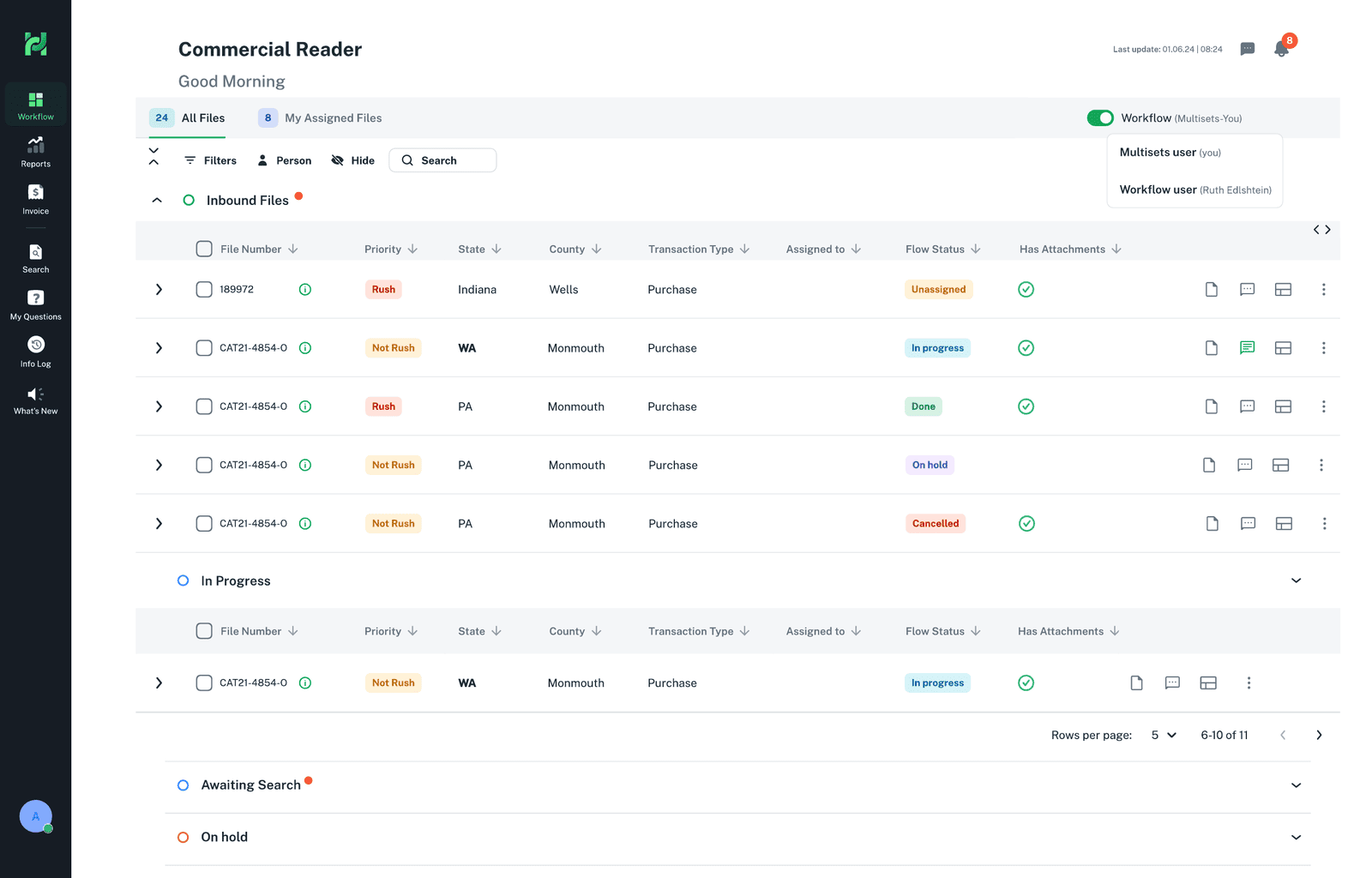
Manager view — every file, grouped by stage
ProblemA manager couldn't see, in one place, where work stood across the team.
In the screenAll files, assignments and flow status grouped by stage (In Progress, Awaiting Search, On Hold), with priority and attachments visible.
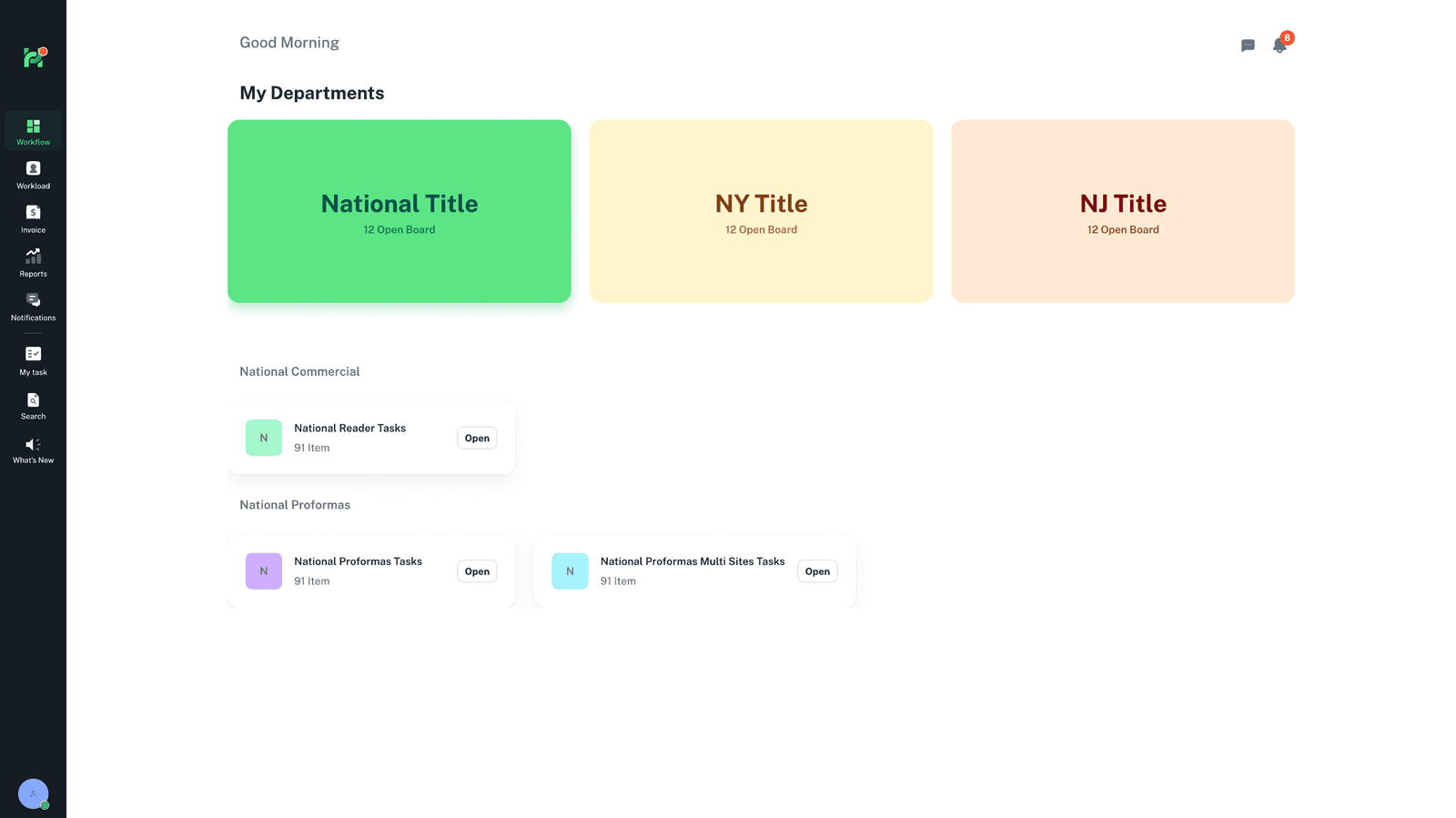
Boards and open work across departments
ProblemManagers needed to move between departments without losing the thread.
In the screenEach department's boards and open work are surfaced together, adapting to what the manager oversees.
Impact on the Platform
Operational Visibility gave managers a way to run the operation — not just a nicer employee view. It is the domain that demonstrates enterprise management design, and it closes the loop: the workspace does the work, validation makes the data trustworthy, and management steers the whole.