LeaseProbe Real Diligence
A zero-to-one product for a commercial real-estate due-diligence firm. It began as a business problem — clients depended on the internal operation for every answer — and became a complete client experience. Building it meant changing how the company works, not just adding a login: this was a systems project, not a UI project.
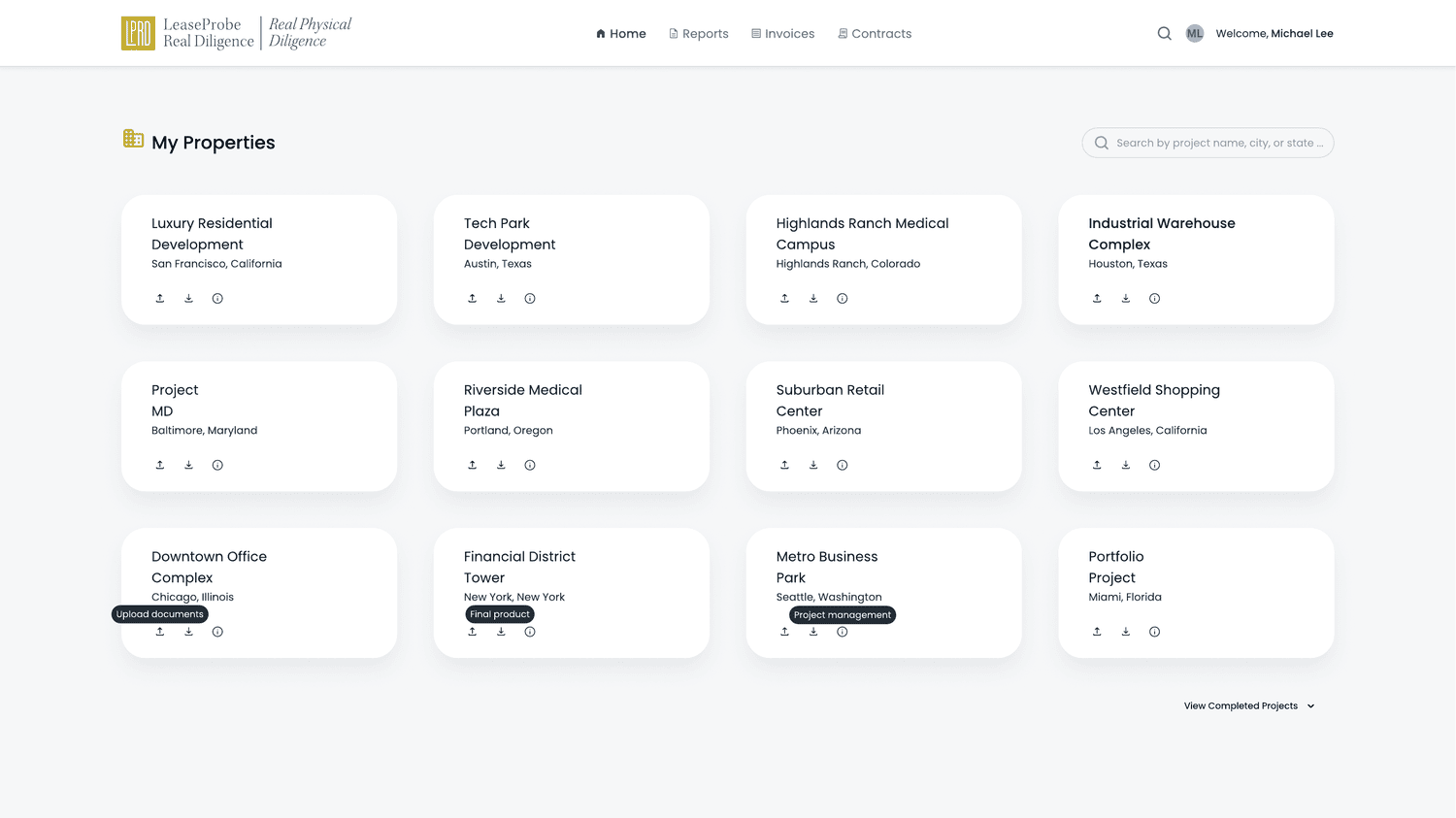 NavigationReportsInvoicesContractsGlobal searchYour propertiesQuick actions
Project Snapshot
Business Discovery
LeaseProbe Real Diligence (LPRD) performs due-diligence research for commercial real-estate transactions — reports, lease abstracts, contracts, invoices and supporting documents, hundreds of pages per engagement. Before this project the client experience was almost entirely document-based: reports arrived as PDFs, questions moved through email threads, missing documents were requested manually, and invoices were sent separately. Once a project started, information fragmented across inboxes, folders, spreadsheets and phone calls — and the business felt every crack.
The work started with discovery on three fronts — not with screens:
Business discovery
Workshops and stakeholder interviews mapping how work actually happens inside LPRD — how projects run, how reports are produced, how documents are collected, and what could safely be exposed to clients.
Client research
How institutional clients really work with due-diligence output — what they search for, which files matter most, and where the friction lives.
Industry & pattern research
How comparable enterprise client platforms handle project dashboards, document management, search, permissions and communication.
Operational Discovery
Discovery kept pointing to the same place: the client experience was capped by the internal operation. To learn even a simple thing — where a project stood, whether a document had arrived — a client had to route the question through LPRD’s team, who reassembled the answer by hand from email, folders and calls. The operation was the single point every client depended on, and it didn’t scale.
What the operation did by hand
- Chased missing documents by phone and email
- Answered ‘where does my project stand?’ case by case
- Cross-checked values against the source lease
- Relayed report findings and open questions
- Tracked invoices in separate statements
What the client actually needed
- To see project status without asking
- To find any record without a request
- To supply missing documents in place
- To respond to findings with context
- To reconcile billing themselves
Core Insight
The pivotal realization: a portal bolted on top of the manual operation would just move the bottleneck. Giving clients independence required restructuring the two-way workflow itself — turning manual document requests and email questions into structured objects the operation and the client share — and deciding, carefully, what could be exposed to clients and what stays internal. This is why it was a systems project, not a UI project: the operation and the client experience had to change together.
Once the workflow was restructured, clients could independently:
Product Definition
Discovery didn’t hand us a portal to draw; it defined what the product had to do. Before a single screen, the definition was explicit — and framed as a complete client experience, not another portal:
Support the entire project lifecycle
From the engagement through to the final, archived project — not isolated deliverables.
Make project progress transparent
A client should see where things stand without asking a person.
Structure document requests
Turn manual, chased requests into tracked objects with state and history.
Turn scattered communication into one workspace
Replace email threads and calls with a single, contextual two-way channel.
Expose information safely
Show clients their progress without exposing internal operations.
Reduce operational dependency
Free the internal team from answering by hand what the product can answer directly.
Not another portal — a complete client experience. The screens that follow are evidence of that definition, not the definition itself.
How the Product Works
With the product defined, the rest is how it delivers: an architecture clients can navigate, search as the way in, a path from the whole portfolio to a single value, legal-grade data made readable, and actions that keep the two-way workflow in one place. Each section below is evidence that the definition holds up as a working product.
Information Architecture
Clients think in properties and deals, not in “reports” or “emails.” The architecture mirrors that mental model: a persistent top bar for the cross-portfolio areas, and a clean drill-down from the whole portfolio to a single project’s documents and reports. Because every artifact lives inside its project context, a client always knows where they are — and never meets a loose file with no home.
The project is the center of gravity. Every report, document, contract and invoice is reached through the property it belongs to — so depth never costs orientation.
Search Experience
At enterprise scale, menus don’t hold. A national portfolio has too many properties, projects, reports and invoices to browse, so search — not hierarchy — became the primary navigation method. Global search sits on every level; enterprise tables add sortable columns, status and date, and filtering by portfolio, property and project narrows a large set to the exact record.
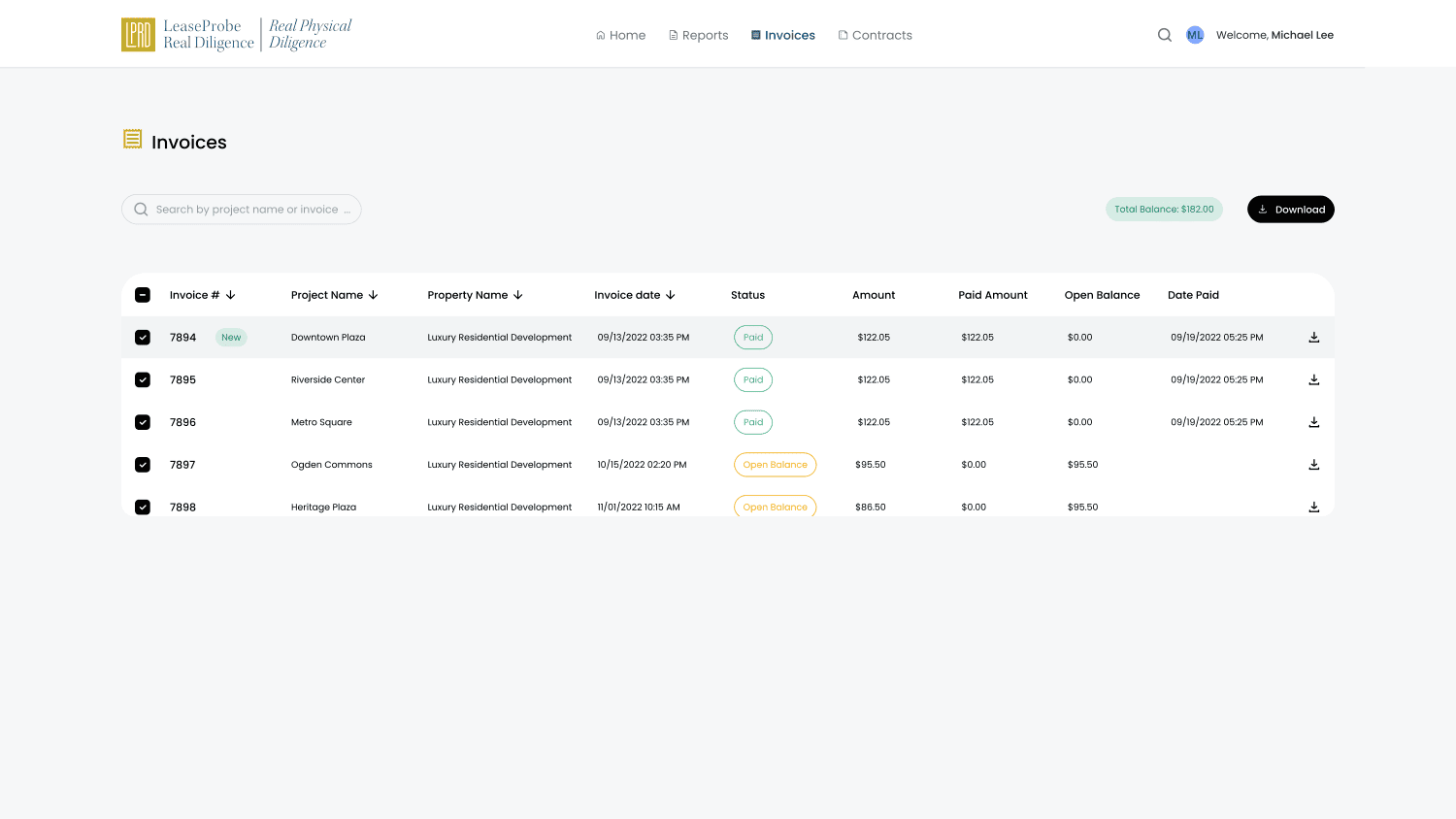 Search project or invoiceRunning total balanceSortable columnsStatus — Paid / OpenPer-row download
Finding Information
Finding information isn’t a set of isolated screens; it’s one continuous act of narrowing. A client starts broad, filters down, inspects a project’s status, then opens the exact report — each step carrying the context of the last.
Every property in one place; search or scan to pick a deal.
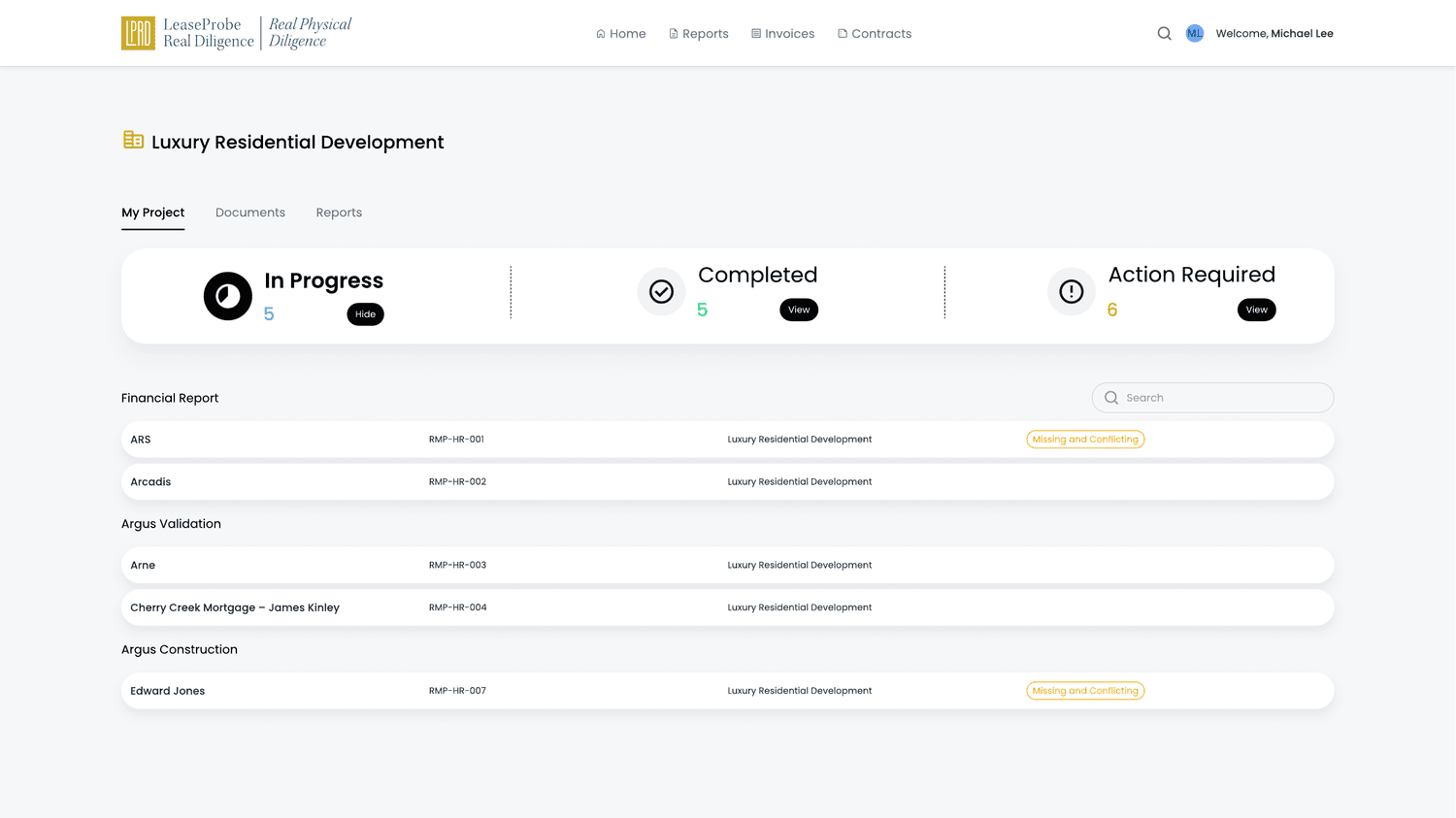
Open a property to its project — status first, reports grouped.
Triage by In Progress, Completed and Action Required.
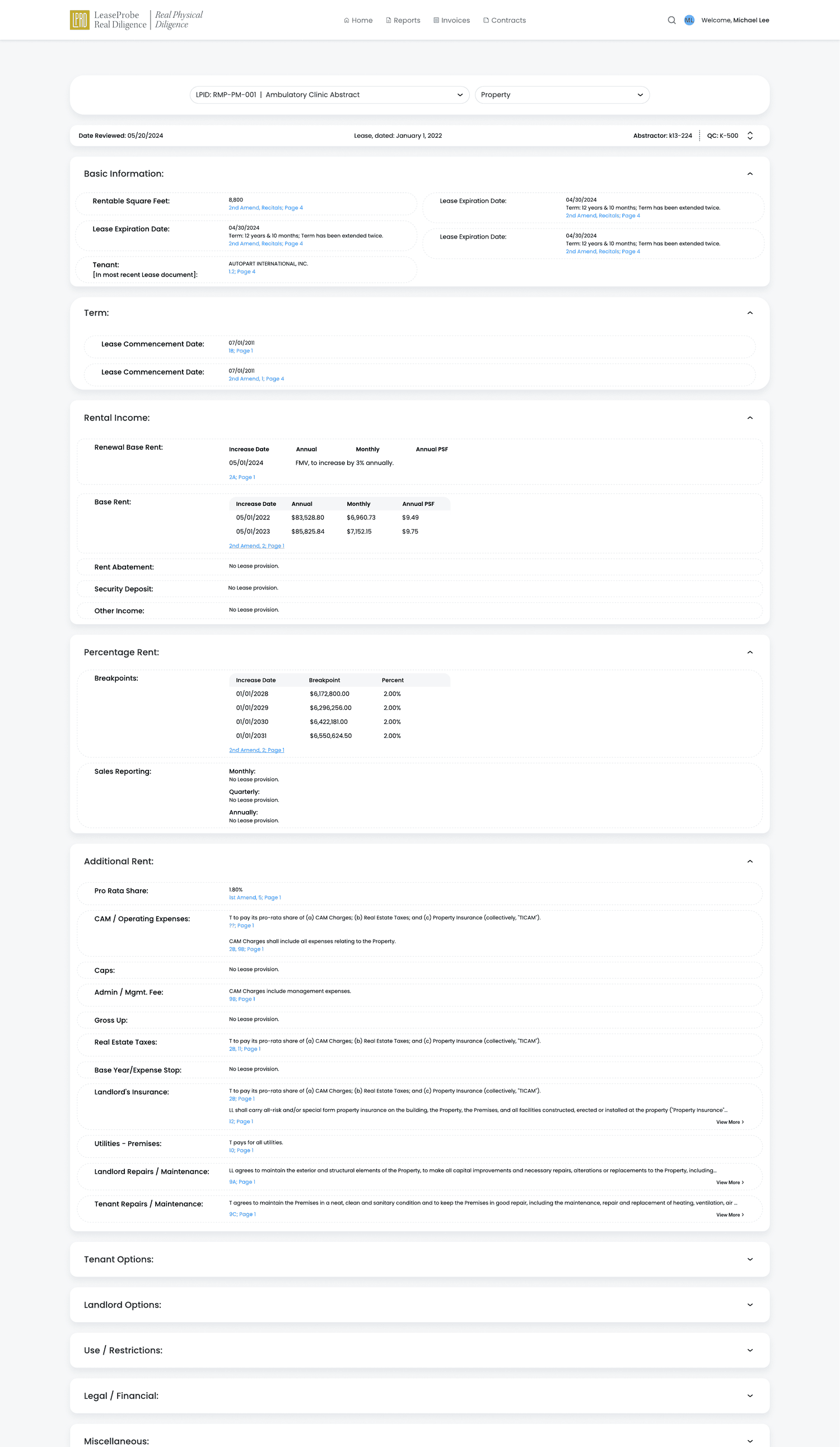
Reach the exact abstract, with every value traceable to source.
Understanding Information
The core deliverable is a dense legal abstract. The design makes it legible through progressive disclosure — a summary first, collapsible sections on demand, and every value anchored to the exact clause and page it came from, so a reviewer can verify without ever asking.
Always visible
The section headers and key values a client scans first.
On demand
Collapsible groups — Term, Rental Income, Additional Rent — open only when needed.
In context
Key–value rows and inline rate tables, grouped and aligned.
On click
Every value cites its amendment, clause and page.
Report & property selectorKey–value rowsEvery value cites its sourceCollapsible sectionsInline rate tablesTaking Action
Understanding is only half the engagement — clients also have to respond, supply missing documents and reconcile billing. Rather than pushing them back out to email, every action is contextual: it happens on the record it concerns, and it keeps its own history.
| Where the client is | What they can do in place |
|---|---|
| An open or conflicting item | Respond with rich text, attach files from the project, send — with full history |
| A report or finding | Export to Excel, open details, review the source |
| Documents | Upload, batch-download, open a credentialed shared link |
| Invoices | See status and open balance, download the invoice |
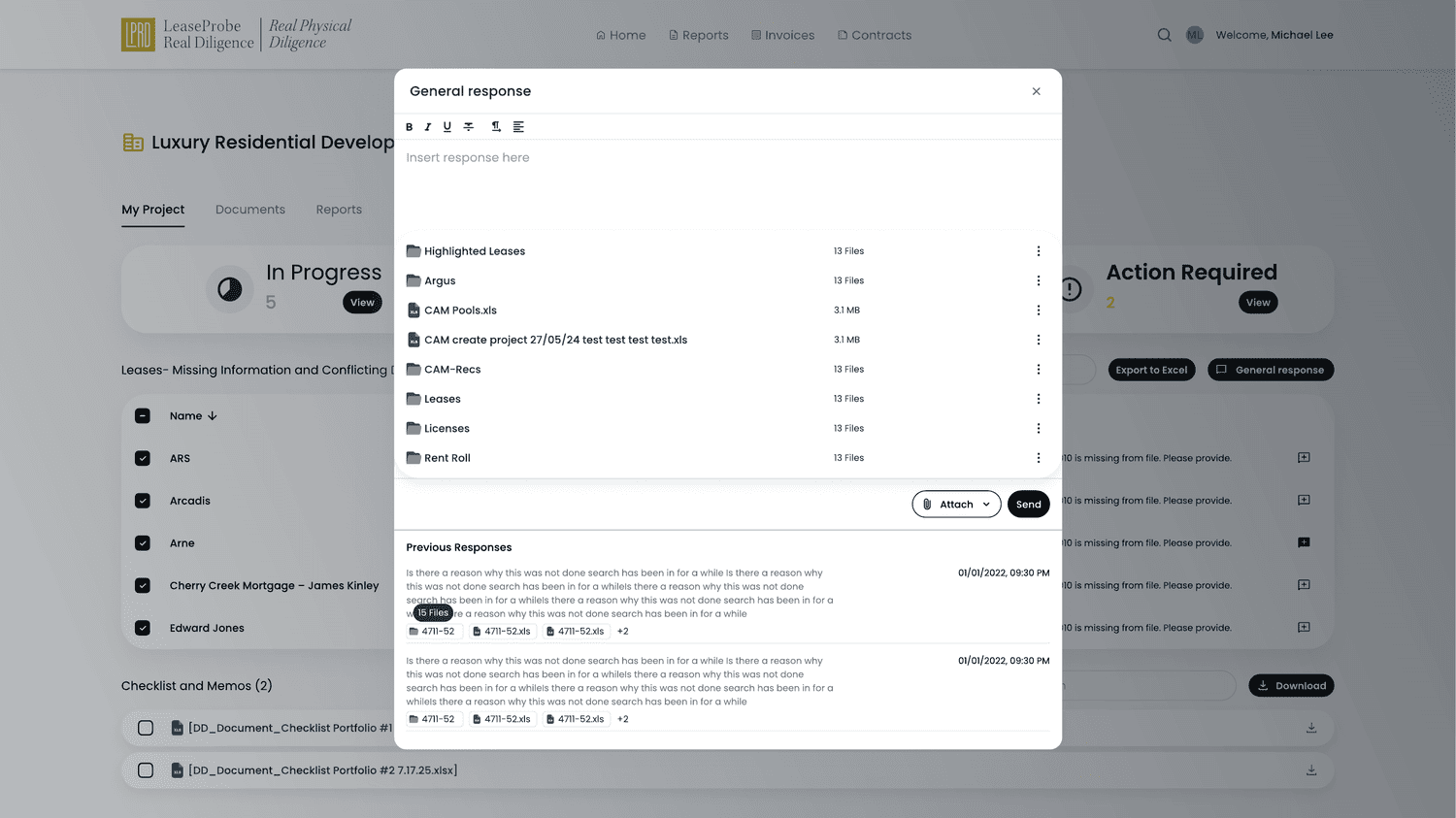 Rich-text responseAttach files from the projectExport to ExcelFull response history
Product Decisions
The project is the center of gravity.
WhyClients think in deals, not document types; anchoring everything to a project keeps depth navigable.
RejectedA flat document library — files would lose the context that tells a client which deal they belong to.
Status before content — triage leads every level.
WhyThe deepest frustration was not the documents but not knowing where things stood.
RejectedA content-first list — clients would have to read everything to discover what actually needed them.
Every value carries its source.
WhyIn due diligence every number is a claim; a reviewer must verify it against the lease, not trust it.
RejectedValues without provenance — attorneys would have to re-open the source lease to trust a single figure.
Structure the conversation as objects, not threads.
WhyRequests and responses need state, context and history — things an email thread quietly loses.
RejectedEmail back-and-forth — ‘as per my last email’ would remain the system of record.
Search is the primary navigation, not menus.
WhyA national portfolio is too large to browse; clients arrive knowing what they want to find.
RejectedDeep menu hierarchies — clients would click through levels instead of reaching a record directly.
Design Evolution
The portfolio and project views moved from a dense, undifferentiated list toward grouped state and a scannable card grid with status up front. Shown as a schematic to foreground the reasoning behind the layout.
Final Product Experience
Read left to right, these screens trace the path a client actually walks — each doing one job in the story of finding, understanding and acting on their data.
The whole book of business, one card per deal.
Global search and filters narrow the portfolio to one record.
Status-first triage across a project’s grouped reports.
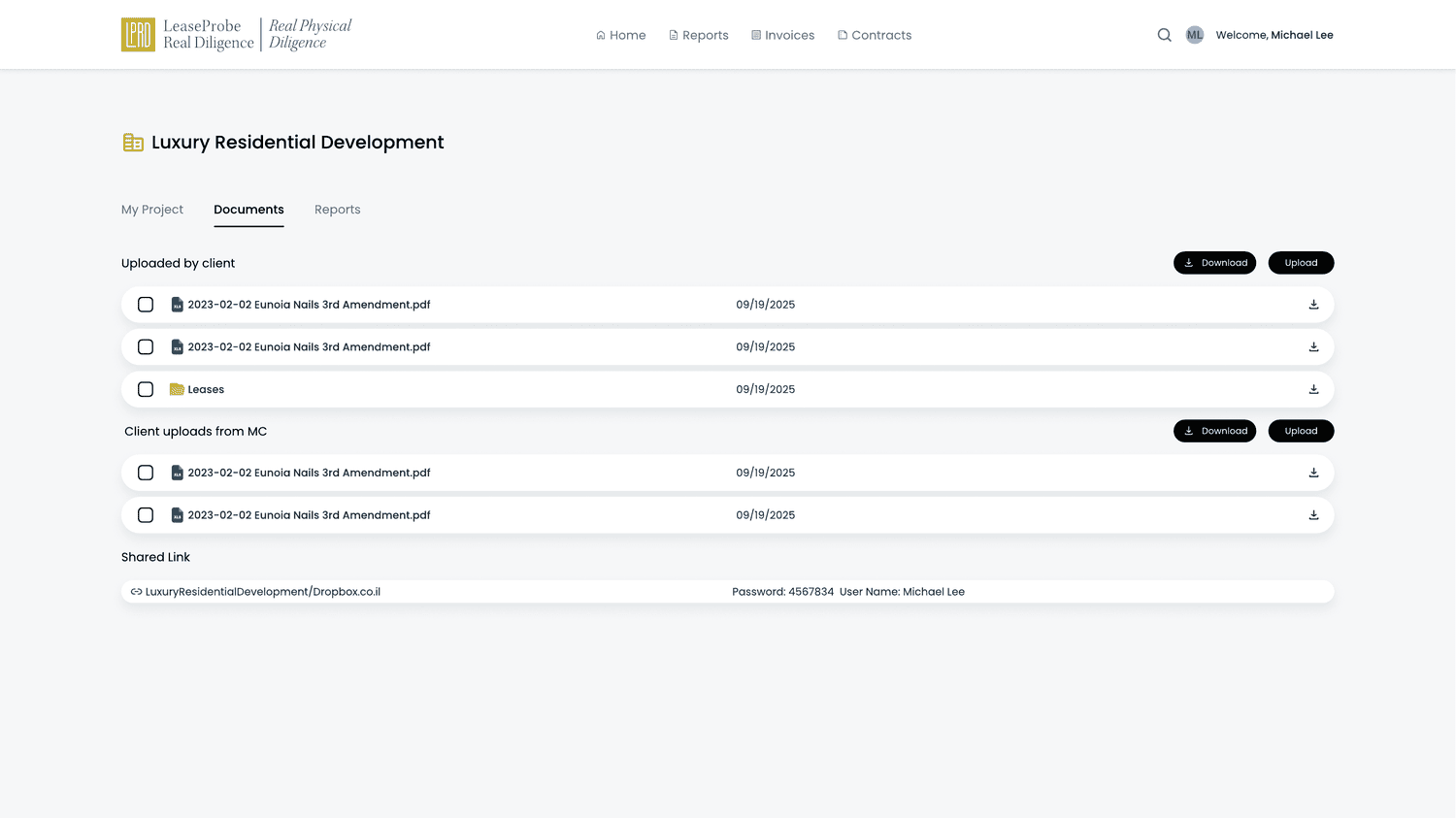
Files grouped by source — client, company, shared link.
The abstract, made readable and traceable to source.
Resolve open items with attachments and history in place.
Billing in a sortable table with status and open balance.
Impact
Clients previously relied on internal teams to obtain operational information; the portal centralized access to property intelligence into one self-service experience. External users can now search, filter, inspect, respond, export and understand their own portfolio directly — turning a stream of isolated deliverables into a place a client opens and, within seconds, knows exactly where their deal stands and what happens next.
The portal shipped and is in active use as the client-facing product today — and it keeps growing. Recent additions I designed include a digital signature flow and a two-way link between each abstract value and its source document, so a client can jump from a figure to its origin in the lease — and back — in a single click.
Design System
The portal builds on LPRD’s existing brand — the gold mark, the navy, the serif signature — extended with the components client-facing work demanded: a card anatomy with a three-state triage model, sortable enterprise tables, citation-anchored key–value rows, source-grouped file lists, and attachable response dialogs.